
-as of [31 MARCH 2026]-
.
.
“SHOW FACETIME”
.
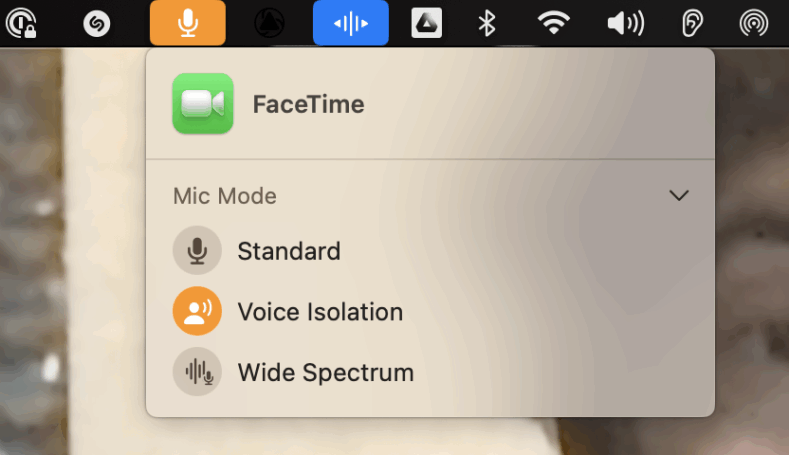
*CLICK THE “MICROPHONE ICON” IN YOUR “STATUS MENU BAR” + CHOOSE “VOICE ISOLATION”* —>
.
-THE “MIC MODE” SETTING IS SAVED THE NEXT TIME YOU OPEN “FACETIME”-
.
You can adjust the microphone settings on Mac to filter out background sounds or capture the sounds around you.
On your Mac, open an app that supports Mic Modes, such as FaceTime.
Click Video in the menu bar, then click Mic Mode
.
Do any of the following (options vary by app):
To filter out background sounds, select Voice Isolation.
To include the sounds around you, select Wide Spectrum.
To revert to the standard mic mode, select Standard.
.
On macOS, the “Standard” microphone mode captures audio as is, while “Voice Isolation” prioritizes your voice and filters out background noises
.
Here’s a more detailed explanation:
Standard:
This mode uses standard voice processing, meaning it captures audio with minimal filtering or noise reduction
.
Voice Isolation:
This mode prioritizes your voice and blocks out ambient noises, making it useful for calls or recordings where background noise is a concern
.
Wide Spectrum:
This mode leaves ambient noises unfiltered, capturing all sounds around you
.
How to access Mic Modes:
You can access Mic Modes within apps that support them, such as FaceTime, by looking for a button that says “Mic Mode” or similar.
.
Where to find Mic Modes:
You can find the Mic Mode settings in the Control Center on your Mac
.
Helpful?
Character limit: 250
Please don’t include any personal information in your comment.
Maximum character limit is 250.
Thanks for your feedback.
support.apple.com /en-in/guide/mac-help/mchle82b42f0/mac
Use Mic Modes on your Mac
2-2 minutes
Select version:
Modifying this control will update this page automatically
.
.
.
*👨🔬🕵️♀️🙇♀️*SKETCHES*🙇♂️👩🔬🕵️♂️*
.
.
👈👈👈☜*-MACBOOK MICROPHONES-* ☞ 👉👉👉
.
.
💕💝💖💓🖤💙🖤💙🖤💙🖤❤️💚💛🧡❣️💞💔💘❣️🧡💛💚❤️🖤💜🖤💙🖤💙🖤💗💖💝💘
.
.
*🌈✨ *TABLE OF CONTENTS* ✨🌷*
.
.
🔥🔥🔥🔥🔥🔥*we won the war* 🔥🔥🔥🔥🔥🔥