
-as of [29 AUGUST 2026]-
.
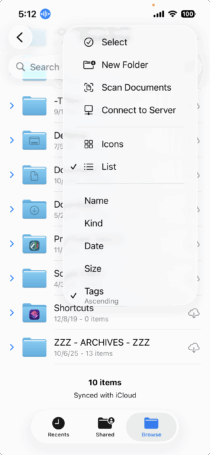
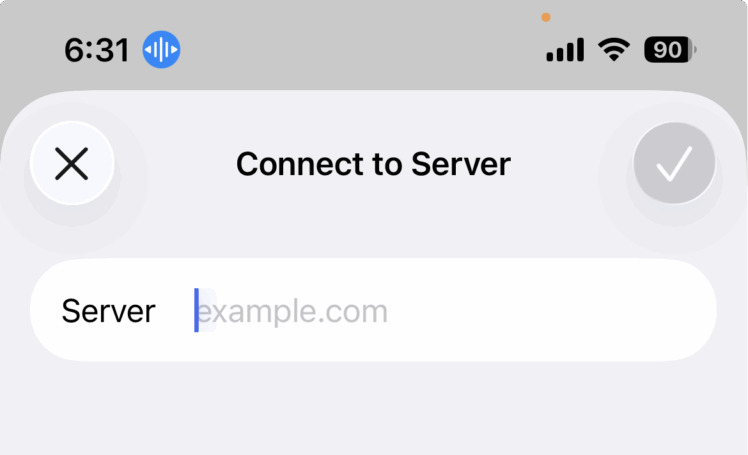
“Connect to server” in the Files app means your iPhone or iPad will use the network to access files stored on another computer or network-attached storage (NAS) device
This allows you to treat the server’s files as if they were part of your device’s local storage, enabling you to open, copy, and move them
You will need to provide the server’s network address, and possibly a username and password, to establish the connection, which is typically made over a local network using the SMB protocol. [1, 2, 3, 4]
How to connect
- Open the Files app on your iOS device.
- Tap the Browse tab at the bottom.
- Tap the More icon (three dots) at the top of the screen.
- Select Connect to Server.
- Enter the server’s local hostname or IP address (e.g., smb://192.168.1.10 or smb://myservername).
- Tap Connect.
- If prompted, select your connection type (Guest or Registered User) and enter your user credentials.
- Tap Next and then select the shared volume or folder you want to access. [3, 4, 5, 6]
What you’ll need
- A server: This could be a Windows computer, a Mac, or a NAS drive on your local network. [1, 2]
- SMB protocol enabled: Your server must have the Server Message Block (SMB) protocol running to be accessible by the Files app. [1]
- Server address: You need the IP address or local hostname of the server. [3, 4]
- Login credentials: You may need a username and password to connect to the shared folder. [3, 4]
AI responses may include mistakes.
[1] https://www.techrepublic.com/article/how-to-use-the-files-app-to-connect-to-a-network-server-from-your-iphone-or-ipad/
[2] https://www.youtube.com/watch?v=cBztyp3SG5c
[3] https://support.apple.com/en-is/guide/iphone/iphe9aff429a/ios
[4] https://www.youtube.com/watch?v=PHz7JVkJwKU
[5] https://discussions.apple.com/thread/253076026
[6] https://discussions.apple.com/thread/254708579
.
.
.
*👨🔬🕵️♀️🙇♀️*SKETCHES*🙇♂️👩🔬🕵️♂️*
.
.
👈👈👈☜*-FILES iOS APP-* ☞ 👉👉👉
-INSTRUCTIONS-
.
.
💕💝💖💓🖤💙🖤💙🖤💙🖤❤️💚💛🧡❣️💞💔💘❣️🧡💛💚❤️🖤💜🖤💙🖤💙🖤💗💖💝💘
.
.
*🌈✨ *TABLE OF CONTENTS* ✨🌷*
.
.
🔥🔥🔥🔥🔥🔥*we won the war* 🔥🔥🔥🔥🔥🔥