
-as of [8 AUGUST 2025]-
.
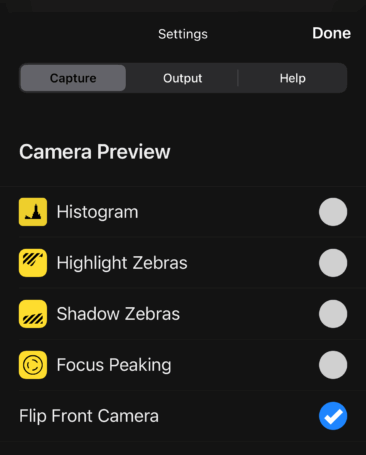
*CAMERA PREVIEW* —>
.
.
-HIGHLIGHT ZEBRAS-
.
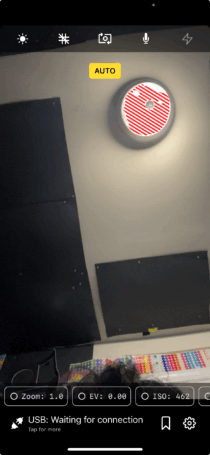
In the OBS Camera iOS app, when you enable the Zebra setting, the striped lines that appear over parts of your frame are highlight warnings
.
Here’s what these zebra lines indicate:
Overexposed Areas:
The zebra patterns highlight areas of your image that are at risk of being overexposed or “blown out”, meaning they are so bright that they lack detail and cannot be recovered in post-production
.
Brightness Threshold:
You can typically set a threshold level for the zebra stripes (e.g., 70%, 80%, 90%, 100%).
.
Higher Percentages (90-100%):
Indicate areas that are close to being, or are already, completely overexposed.
This is useful for preventing highlights from being completely lost
.
Lower Percentages (70-80%)
Can be used to help expose for mid-tones, like skin tones, by indicating when those areas are becoming too bright.
Real-time Feedback: Zebras provide real-time visual feedback, allowing you to adjust your exposure settings (like aperture, shutter speed, or ISO) until the zebra pattern disappears or appears in the desired areas, helping you achieve a properly exposed image
.
Important to Remember:
Highlight Warnings, Not Exposure Control:
Zebras are a visual aid and don’t directly control exposure.
They warn you about potentially problematic areas
.
Not Recorded in the Image:
The zebra patterns are for your eyes only and will not appear in your final photo or video recording
.
By using the zebra setting effectively, you can avoid common exposure mistakes and capture images and videos with a better balance of brightness and detail.
.
-SHADOW ZEBRAS-
.
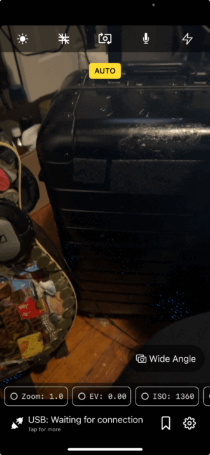
-DEPICTS SECTIONS IN [FRAME] THAT ARE “UNDEREXPOSED”-
.
-FOCUS PEAKING-
.
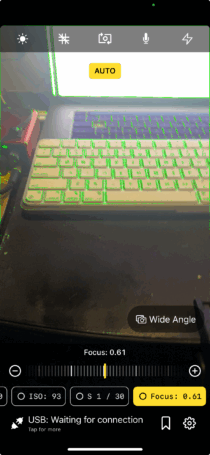
-AFTER TURNING THIS SETTING ON, TAP THE “FOCUS BUTTON” TO VIEW “COLORED OUTLINES” AROUND AREAS IN SHARPEST “FOCUS”-
.
-FLIP [FRONT CAMERA]-
-WHEN “UNFLIPPED”, YOUR “CAMERA PREVIEW FRAME” DEPICTS HOW “OTHERS” SEE “YOU”-
-IF “OTHERS” WERE “YOU” AND “YOU” WERE THE “CAMERA PREVIEW FRAME”-
-IF I MOVE MY FINGER [LEFT —> RIGHT], A PERSON FACING ME SEES MY FINGER MOVING [RIGHT —> LEFT]-
-ASSUME THAT EVERYONE READS [LEFT —> RIGHT] + [NORTH —> SOUTH]-
-IF YOU WANT SOMEONE FACING YOU TO READ A WORD ON YOUR SHIRT, DRAW YOUR [FIRST LETTER] ON YOUR [RIGHT NIPPLE] + PROGRESS TO [LEFT NIPPLE]-
(WITH LETTERS FACING “AWAY” FROM YOU + “TOWARDS” THE PERSON FACING YOU)
.
-HORIZONTALLY FLIPS “CAMERA PREVIEW” FRAME FOR [FRONT CAMERA]-
-ALTHOUGH THE [FRAME] IS NOT [HORIZONTALLY FLIPPED] WHEN TRANSMITTED TO [OBS]-
-WHEN YOU TURN THIS SETTING ON, YOU CAN VIEW YOUR “MIRROR IMAGE”-
-IMAGINE THAT YOUR “MIRROR IMAGE” IS YOUR “AUDIENCE”-
.
.
*👨🔬🕵️♀️🙇♀️*SKETCHES*🙇♂️👩🔬🕵️♂️*
.
.
👈👈👈☜*-[CAPTURE] TAB-* ☞ 👉👉👉
-[OBS CAMERA] iOS APP-
.
.
💕💝💖💓🖤💙🖤💙🖤💙🖤❤️💚💛🧡❣️💞💔💘❣️🧡💛💚❤️🖤💜🖤💙🖤💙🖤💗💖💝💘
.
.
*🌈✨ *TABLE OF CONTENTS* ✨🌷*
.
.
🔥🔥🔥🔥🔥🔥*we won the war* 🔥🔥🔥🔥🔥🔥